
Active Warrants in Pinellas County
Active warrants in Pinellas County are issued by Circuit Court judges and County Court judges sitting in the Sixth Judicial Circuit. A warrant authorizes law enforcement to arrest a named person. Warrants reach the public record through two paths. One path is the statewide FDLE wanted-person database, which tracks persons wanted for felonies and serious misdemeanors across Florida. The second path is the Pinellas County Clerk court records system, where a capias or warrant entry appears directly in the docket of the case that generated it.
The Pinellas County Sheriff's Office does not publish a separate local warrant search on its website. Instead, the PCSO warrants page sends users to the FDLE statewide tool and notes that the FDLE search does not cover all local Pinellas warrants, such as parking-ticket warrants. For those local warrant questions, PCSO points to the Pinellas County Clerk of the Circuit Court and Comptroller at (727) 464-7000. That combination, FDLE for statewide results and the Clerk for local case-level warrant entries, is the correct two-step approach for most searches.
When a warrant does lead to an arrest and booking into the Pinellas County Jail, the Sheriff arrest inquiry will show the arrest type. Values like Adult Warrant, Traffic Warrant, and 948.06-VOP indicate the person was taken into custody on a warrant rather than on direct police contact. Those arrest-type codes are explained in more detail below. The warrant itself stays in the court case docket; the booking record documents the custody event.
Types of Pinellas County Warrants
Not all warrants work the same way. Pinellas courts and law enforcement use several distinct warrant types, each with its own legal basis and process. Knowing the type matters when you are trying to find a warrant record, understand what it means, or figure out how to resolve it.
- Arrest warrant - Issued when a judge finds probable cause that a person committed a crime; it commands law enforcement to arrest and bring that person before the court.
- Bench warrant / capias - Issued by a judge, often after a defendant fails to appear for a required court date, is held in contempt, or violates a court order; the term "capias" is the formal Florida term and appears in Clerk docket entries.
- Traffic warrant - Appears in PCSO booking records as arrest type "Traffic Warrant"; typically arises from unresolved traffic citations or failure to appear on a traffic charge and leads to a license-related hold or arrest.
- Probation violation warrant / 948.06-VOP - Issued under Florida Statute 948.06 when a probationer is alleged to have violated supervision conditions; appears in PCSO booking records as arrest type "948.06-VOP."
- Search warrant - Authorizes law enforcement to search a specified place, person, or property; generally not public until executed and the return is filed with the court, and may be temporarily sealed.
- Fugitive / out-of-county warrant - Issued in another jurisdiction and may involve extradition or a hold placed on a person in Pinellas County custody.
- Risk protection / firearm disability order - Handled in specialty court sections of the Sixth Judicial Circuit; can restrict firearm possession and may involve a related warrant if violated.
Search warrants are the least visible type in public records. They are often sealed at the time of execution so they do not alert the target. After the search is completed and the return is filed, the warrant may become part of a public criminal case file. If the criminal case docket contains the warrant, it can appear in the Clerk's court records portal under the associated case number.
Note: A capias entry in the Clerk docket does not always mean the person is currently a fugitive. The docket may show a capias was issued and later recalled if the person appeared or the matter was resolved.
How to Search Pinellas County Warrants
Pinellas County warrant searches run across multiple official tools. The FDLE statewide database is the broadest starting point for serious warrants. The Clerk court records portal is the right place to check whether a warrant or capias entry is tied to a specific case. The Sheriff arrest inquiry shows whether a warrant has already led to a booking. Crime Stoppers is an option if you have information about a wanted person rather than looking for your own record. Steps below describe how to use each tool.
- Go to the PCSO warrants page and follow the link to the FDLE statewide wanted-person search. Enter the person's name or other available identifiers. The FDLE tool searches statewide wants and warrants but will not return local Pinellas warrants like unpaid parking citations.
- Visit the Pinellas Clerk court records portal and search by name or case number. Look at the docket entries of any matching criminal or traffic case. Entries labeled "capias," "warrant issued," "bench warrant," or similar indicate a court-issued warrant in that case. If you have a court case number from a prior arrest or citation, search by that number first.
- If you believe a warrant may have already led to a booking in the Pinellas County Jail, search the Sheriff arrest inquiry. Filter by arrest type to see entries coded as Adult Warrant, Traffic Warrant, or 948.06-VOP. This tool covers current inmates and persons released within the last 30 days.
- Call the Clerk at (727) 464-7000 for case-related warrant or capias questions that the online portal does not resolve. Staff can confirm whether a warrant entry is active, recalled, or satisfied, though they cannot provide legal advice.
- If the search is for a violent or serious offender and you want to share a tip rather than verify your own record, use Crime Stoppers of Pinellas at www.crimestoppersofpinellas.org, call TIPS (8477), or use the P3 Tips app. Tips can be anonymous.
Pinellas County Warrant Search Fields
Because Pinellas warrant searches span multiple tools, the fields available depend on which system you use. The table below summarizes the search inputs for each official source. No single portal has all fields in one place. The FDLE tool, Clerk portal, and Sheriff arrest inquiry each have their own field sets.
| Field Label | Type | Required | Notes |
|---|---|---|---|
| FDLE wanted-person search | External database | Varies | Statewide wanted-person search; does not search local Pinellas-only warrants such as parking-ticket warrants. |
| Clerk case number | Text | Optional | Use to find warrant/capias entries on a specific court case; Pinellas criminal case numbers follow formats such as 25-01828-CF-1. |
| Clerk party name | Text | Optional | Search by person or business name in the Clerk portal when no case number is known; try spelling variations. |
| Sheriff last name | Text | Conditional | Required for the Sheriff arrest inquiry unless searching by docket number or booking date; returns current inmates and 30-day releases. |
| Sheriff filter by arrest type | Dropdown | Optional | Values include Adult Warrant, Traffic Warrant, 948.06-VOP, On View, Federal Marshal, Off Bond, Paperwork Only, Remand/Return, DEA/ATF/FBI. |
| Sheriff filter by charge | Dropdown | Optional | Large charge list; examples include Traffic Warrant, Failure to Appear, Probation Violation. |
| Crime Stoppers tip | Phone / web / app | Optional | TIPS (8477), www.crimestoppersofpinellas.org, P3 Tips app; used to report information about wanted persons, not to look up your own warrant. |
What a Pinellas County Warrant Record Shows
When a warrant or capias appears in a Pinellas court case, the Clerk docket entry typically records the type and date. A full charge report from the Sheriff's arrest inquiry, accessed after a warrant has led to a booking, shows additional detail about the arrest and related charges. The PCSO Subject Charge Report includes several warrant-related fields that help explain the person's custody status and bond situation. The table below covers key fields from the arrest inquiry charge report and the Clerk court case record.
| Field | What It Shows |
|---|---|
| Arrest Type | How the person came into custody; values include Adult Warrant, Traffic Warrant, 948.06-VOP (probation violation), On View, Federal Marshal, Off Bond, Remand/Return, Paperwork Only, DEA/ATF/FBI. |
| Court Case Number | The Pinellas Clerk case number linked to the charge; can be entered into the Clerk court records portal to pull the full case docket and capias/warrant entries. |
| Bond Assessed | The bond amount set by the court for the charge; may appear as a dollar amount, "No Bond," or time-served notation. |
| Bond Amount Due | The remaining balance owed on bond after any payments or credits; relevant when evaluating whether a person can be released. |
| Charge Status | Current status of the charge in the PCSO system; does not reflect final court disposition, which must be confirmed through the Clerk case docket. |
| OBTS | Offender Based Transaction System number; a Florida criminal justice tracking identifier that links the arrest event to statewide records processing. |
| Capias / warrant entry in Clerk docket | A docket line in the Clerk court records portal showing that a capias or warrant was issued in the case; may also show if it was later recalled or satisfied. |
| Offense Description / Statute | The criminal charge tied to the warrant, including statute citation and, where applicable, an amended charge description if the charge was later modified. |
The PCSO visit to www.pinellassheriff.gov/warrants shows the Sheriff's official warrant page, which routes users to FDLE for statewide wanted-person results and to the Clerk for local case warrant assistance. The screenshot below captures that referral page.
The Pinellas County Sheriff's Office warrants page confirms that FDLE is the primary statewide search tool and that local warrant questions about specific Pinellas County cases go through the Clerk's office.
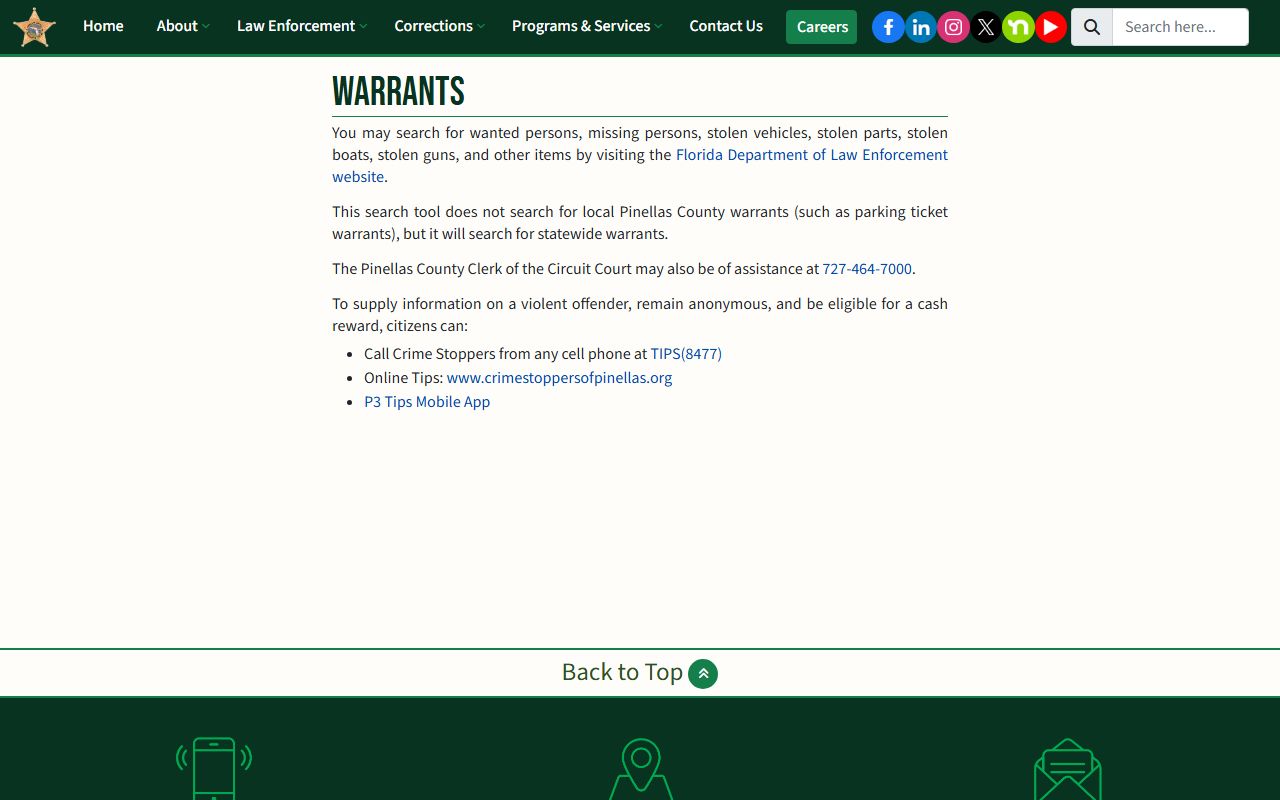
The page makes clear that the FDLE tool does not cover every local Pinellas warrant type, which is why the Clerk at (727) 464-7000 remains the backup contact for case-specific warrant and capias questions.
What to Do If You Have an Outstanding Warrant
Finding an outstanding warrant in your name is stressful, but acting quickly and in the right order reduces risk. The worst response is to ignore it. Warrants do not expire in Florida, and law enforcement can act on them at any time during a traffic stop, routine check, or arrest on an unrelated matter. The steps below walk through a practical resolution path for a Pinellas County warrant.
- Verify the warrant. Check the Clerk court records portal and the FDLE wanted-person search to confirm the warrant exists, which case it belongs to, and whether it has already been recalled. A warrant you heard about secondhand may have been resolved without your knowledge.
- Call the Clerk at (727) 464-7000. Staff can tell you whether a capias or warrant is active in a specific Pinellas case. Ask for the case number, charge, and bond information if available. Do not rely on memory or third-party reports for the exact charge and bond amount.
- Contact a criminal defense attorney or the Public Defender. The Public Defender for the Sixth Judicial Circuit, Sara Mollo, represents eligible indigent clients in Pinellas and Pasco counties. A private criminal defense attorney can review the warrant, advise on strategy, and, in some cases, arrange a voluntary surrender or motion to recall the warrant before you are arrested at an inconvenient time.
- If turning yourself in, confirm the location, bond eligibility, and current jail procedures with PCSO at (727) 464-6415 or with your attorney before arriving. The Pinellas County Jail is at 14400 49th Street North, Clearwater, FL 33762-2877.
- Post bond or purge the obligation if the court allows it. Bond information appears on the PCSO charge report under Bond Assessed and Bond Amount Due. For child support-related capias matters, PCSO inmate information links to a purge process for back payments.
- Attend all court dates after release. Use Florida E-Notify to set up free text or email reminders for court events tied to your case number. Missing court after resolving a warrant can trigger a new capias immediately.
- Confirm the warrant is recalled. Check the Clerk docket after the court hearing to verify that the capias or warrant entry has been marked recalled or satisfied. Do not assume it is resolved until the docket reflects it.
Important: Speak with a licensed attorney before turning yourself in on a warrant so you understand your bond options, potential charges, and the right surrender location.
For probation violation warrants coded 948.06-VOP, the process is similar but the resolution often requires a probation violation hearing before a judge. The State Attorney's office at www.flsa6.gov prosecutes violation cases in the Sixth Judicial Circuit. If you have a probation officer, contacting them directly before the arrest can sometimes lead to an administrative resolution, but only counsel can advise whether that is appropriate in your situation.
Bond and Purge Information for Pinellas Warrants
Bond is the financial condition a court sets for release after an arrest on a warrant. In Pinellas, bond amounts appear on the PCSO Subject Charge Report under two separate fields: Bond Assessed and Bond Amount Due. Bond Assessed is the amount the court set. Bond Amount Due is what remains unpaid. If the two figures are different, partial payment may have been made or a credit applied.
Posting bond does not resolve the underlying case or dismiss the warrant. It secures release from custody while the court case continues. The warrant is considered executed once the person is arrested; the Clerk docket should reflect the arrest and, if applicable, the bond amount. A surety bond company, sometimes called a bail bondsman, can post bond on behalf of the defendant for a nonrefundable premium. Cash bond can also be posted directly with the jail.
For child support-related capias matters, "purging" the capias typically means paying the overdue child support amount specified by the court order. PCSO inmate information links to purge procedures. The exact purge amount comes from the family court order or the Clerk's family division, not from the jail. Confirm the correct amount before paying to avoid errors that delay release.
Note: Bond information on the PCSO charge report reflects the jail's records at the time of viewing and may not be current if bond has been posted, modified, or revoked since the last update.
Using the Pinellas Clerk Case Search for Warrant Entries
The Pinellas Clerk court records portal is the official tool for finding capias and warrant entries linked to a specific court case. The portal is free and does not require login for most criminal, civil, and traffic cases. Family and probate cases require registered access, and juvenile records are not available online.
To find a warrant or capias in the Clerk system, you need either a case number or the defendant's name. Case numbers for criminal matters in Pinellas typically follow a format such as 25-01828-CF-1, where the two-digit year, sequence number, case type code (CF for circuit felony, MM for misdemeanor), and suffix appear. The statewide Uniform Case Number is a longer format such as 522020CF000088000APC. Both can be entered in the Clerk portal search.
When the case docket loads, scroll through the entries and look for lines that include the words "capias," "warrant issued," "bench warrant," "warrant recalled," or similar. These entries show the date the warrant was issued and, if applicable, the date it was recalled or satisfied. The Clerk's office also maintains the Clerk of the Circuit Court and Comptroller's copy request system for certified copies of warrant-related documents if you need them for court, immigration, or other official purposes.
The Clerk criminal/juvenile page gives additional guidance on how criminal case records are structured and how to use the court calendar option for hearing date information rather than reading through every docket entry.
Crime Stoppers and Anonymous Tips
Crime Stoppers of Pinellas operates a reward-based tip line for information about violent crimes, wanted persons, and other serious offenses in Pinellas County. Tips can be submitted by phone, online, or through the P3 Tips mobile app, and they can be made anonymously. The program has paid cash rewards for information leading to arrests.
To reach Crime Stoppers of Pinellas, call the TIPS line at TIPS (8477) or visit www.crimestoppersofpinellas.org. The P3 Tips app allows mobile submissions. Crime Stoppers tips are handled separately from official police reports and are not tracked back to the tipster if submitted anonymously through approved channels. Rewards vary by case and are paid only when an arrest results from a qualifying tip.
Crime Stoppers is the right channel if you have information about someone who has an active warrant and is evading arrest. It is not a tool for looking up your own warrant status or checking whether someone's warrant has been resolved. For those needs, use the Clerk portal and the FDLE wanted-person search as described above.
Restricted Pinellas County Warrant Records
Not all warrant records are visible to the public. Florida law and court rules create several categories of restricted or sealed warrant-related materials. Understanding these limits helps explain why a search may return no result even when a warrant is known to exist.
Search warrants are often sealed at the time they are issued and executed, particularly in active investigations. Once the search is complete and the related criminal case is filed, the warrant may become part of the public docket, but the sealing period can delay its appearance. If the investigation does not result in a public criminal charge, the search warrant may remain inaccessible.
Juvenile warrants are subject to Florida's confidentiality rules for juvenile court records. The Pinellas Clerk states juvenile court records are not currently available online. Requests involving juvenile cases must be handled at the Pinellas County Justice Center and may require the juvenile defendant to appear in person with valid identification. Risk protection order records, when related to mental health or firearm disability matters handled in probate or specialty court sections, may also have restricted public access.
Federal warrants issued by U.S. District Court for the Middle District of Florida are not in the Pinellas Clerk system. They are maintained in federal PACER/CM-ECF records and are a separate filing system from state court. If a person is being held in the Pinellas jail on a federal hold, the PCSO arrest type may show "Federal Marshal" or "DEA/ATF/FBI," but the underlying warrant is a federal court record and must be searched through PACER for the Middle District of Florida.
Florida Rule of Judicial Administration 2.420 governs confidentiality of judicial branch records broadly, and Florida Statutes section 119.0714 covers specific exemptions for court files and official records. Where a record is partially exempt, the custodian should redact the exempt portion and produce the rest.